> For the complete documentation index, see [llms.txt](https://docs.xploitcheats.com/llms.txt). Markdown versions of documentation pages are available by appending `.md` to page URLs; this page is available as [Markdown](https://docs.xploitcheats.com/hwid-spoofers/xploit-temp-spoofer.md).
# Xploit Temp Spoofer
Requirements (IMPORTANT)
IT IS HIGHLY ADVICED TO NOT SKIP ANY OF THE POINTS OF THIS GUIDE!
### Deactivate your browser security
Video Tutorial (for Google Chrome): [Click here](https://www.youtube.com/watch?v=d90j5ndyvdw)
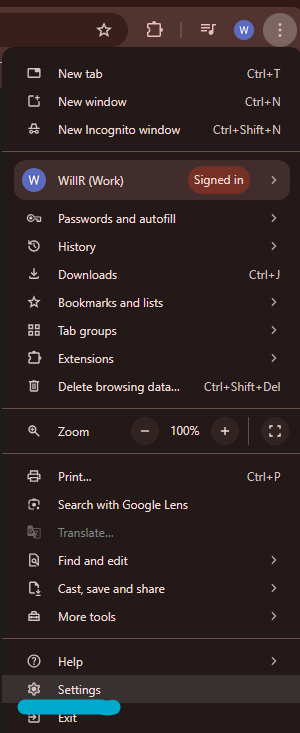
1. Open chrome settings like below.
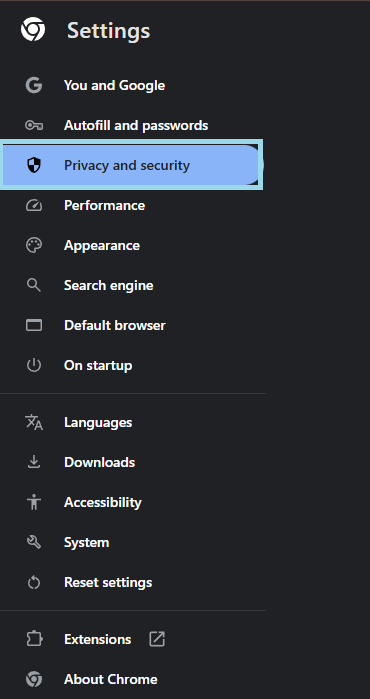
2. Select **"Privacy and security"**
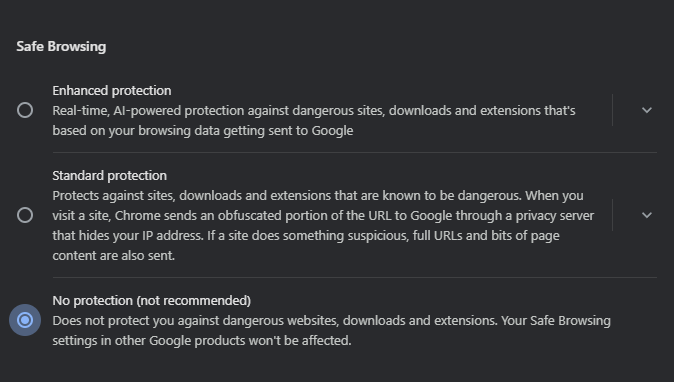
3. Select **"Security"** Option
4. Select **"No Protection"**
### Deactivate or uninstall all antiviruses
Video Tutorial: [Click here](https://www.youtube.com/watch?v=CLIjr7FyxZ8)
1. Open Control Panel & select the **"programs"** section
2. Select **"programs & features"**
3. Search for the name of your installed antivirus & right click, select **"uninstall"**
### Disable Secureboot
Secure boot prevents our spoofer from launching, so make sure it is off.
Video Tutorial: [Click here](https://www.youtube.com/watch?v=z0YJi8RJHK4)
To find the secure boot status do this:
1. Open **"msinfo32"**, by typing msinfo32 in windows search.

1. Go to **"System Summary."**

1. Find line called **"Secure Boot State"**, if its Off / Unsupported, then you are good to go

In case if your secure boot is on, disable it by following the next guide:
**Disable Secure Boot**
Do this to disable secure boot:
1. Enter **"BIOS."**
2. Open **"advanced settings."**
3. Open the section **"BOOT"**, might also be called **"SECURITY"**
4. Open the subsection **"SECURE BOOT"**
5. Open the **"KEY MANAGMENT"** subsection
6. Click **"CLEAR SECURE BOOT KEYS"**
On some motherboard you have to just disable the secure boot instead of clearing the keys.
1. Save your BIOS settings and restart your PC
[PreviousBIOS Mode](https://fecuritydocs.gitbook.io/fecuritydocs/main-content/launching-preparing-for-launch./bios-mode)[NextVirtualization](https://fecuritydocs.gitbook.io/fecuritydocs/main-content/launching-preparing-for-launch./virtualization)\\
### Disable TPM
Gigabyte Motherboard: [Click here](https://www.youtube.com/watch?v=UIQxL_VyAwA)
Asrock: [Click here](https://www.youtube.com/watch?v=r7VzNMOgbRg)
1. Typically you should enter bios with your specific hot key.
2. Locate **"Boot"** or the equivalent for you motherboard.
3. Find the **"CSM Support"** or **"TPM 2.0"** & disable it.
* If you are unsure open a ticket with us or locate the corresponding video for your motherboard models.
### Disable Fastboot
1. Restart your PC.
2. Enter **BIOS**: Press DEL or F2 as it starts up.
3. Go to the **“Boot”** tab.
4. Find **“Fast Boot.”**
5. Set it to **“Disabled.”**
6. Press F10 to save and exit.
Video Tutorial: [Click here](https://www.youtube.com/watch?v=RPhka-gU8CU)
### Disable BitLocker (Windows)
1. Open **"Control Panel."**
2. Go to **"System and Security"** → **"BitLocker Drive Encryption."**
3. Click Turn off **"BitLocker next to your drive."**
4. Confirm and wait for decryption to finish.
Video Guide: [Click here](https://www.youtube.com/watch?v=AU5nm7b1aT0)
### Uninstall Riot Vanguard & FaceIT
1. Open **"Control Panel again"**
2. Open **"programs"**
3. Select **"programs & features"**
4. Search for **"Vanguard or FaceIT"**
5. Un-Install both if you have them.
Preparation all done! Move onto installing & running the software!
Loader Setup
**Section 1:**
1. Loader Download: [Click Here To Download](https://pub-70ba540078584d5ea1eb9ffb4e58c8e7.r2.dev/loader.exe)
2. Put the file onto your desktop
3. Run the loader as administrator
**Section 2:**
1. Register with a username & password
2. Paste your licence key into the **"enter licence key"** section
3. Press "**Register"**
4. Choose **"Spoofer"** product & press "**Launch"**
**Section 3:**
1. Choose the game or anticheat you wish to spoof
2. Click spoof/clean
3. You are now cleaned & spoofed.
**DONE!**